 Velnode/ Docs / Velnode Accountv2.3.3-beta.15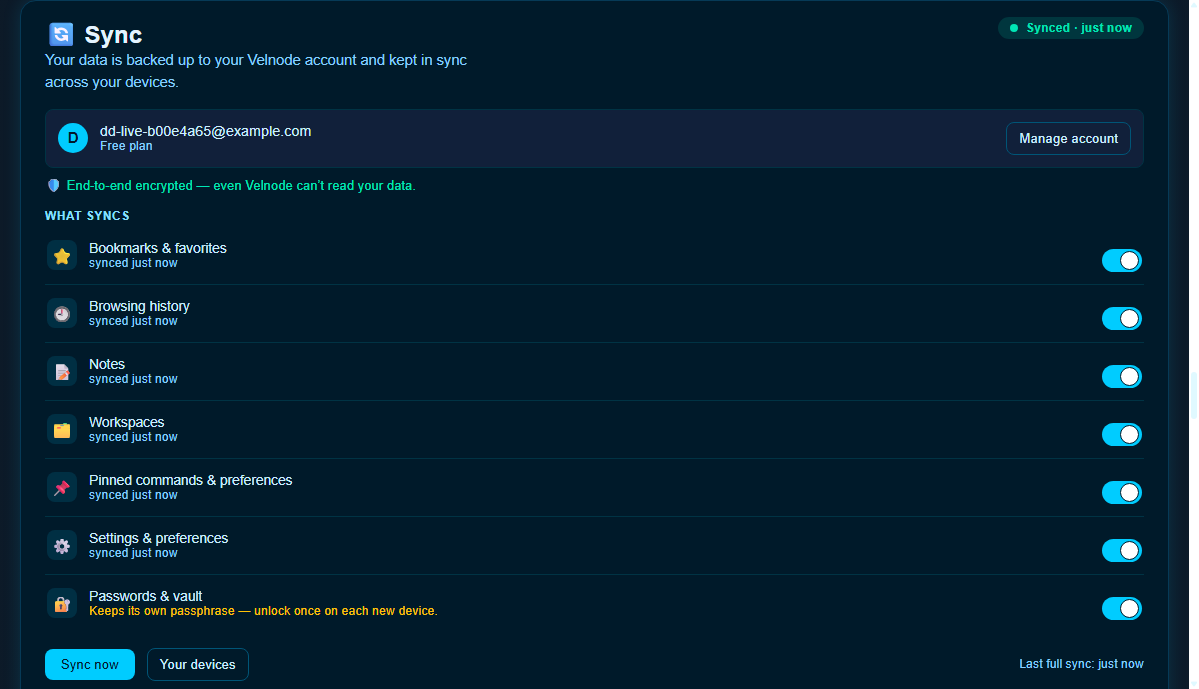
Velnode Browser · a product of Dignity New Zealand Limited
User | Version 1.2 | Last updated 2026-07-03
Document type: User Owner: Dignity New Zealand Limited Applies to: Velnode Browser v1.32 and later Last updated: 2026-07-03 Document version: 1.2 Status: Approved
This guide covers the optional Velnode Account: how to create one, sign in on a new device, manage sync categories, recover access if you forget your password, and sign out.
A Velnode Account is not required to use Velnode. Everything — browsing, bookmarks, the vault, Vee — works fully without an account, and continues to work while you are signed out.
A Velnode Account adds:
Velnode uses a zero-knowledge design for account data.
Your Password Vault is separate. Signing in does not unlock the vault. Vault secrets open only with your vault master passphrase.
For the technical detail, see Architecture Overview §11a and Privacy Policy §4.8.
velora://account in the address bar, or go to Settings → Account → Create account, or choose Sign in / Account from the ☰ menu.After account creation, Velnode shows your Recovery Kit: a 24-word phrase.
Read this carefully before continuing.
This phrase is shown once and is never stored by Velnode or Dignity New Zealand Limited. It is the only way to recover your account data if you forget your password. If you lose both your password and this phrase, any data encrypted to your account is unrecoverable — by anyone. This is by design.
Do at least one of the following:
Click I've saved my Recovery Kit — continue when you are ready. You cannot go back to this screen.
If you restart Velnode on the same device where you created the account, you are signed in automatically. Your data key is cached in the operating system's secure storage (the same mechanism used by the vault). You do not need to type your password on every launch.
Signing out clears this cache. After signing out, you need your password to sign back in on that device.
Signing in turns sync on automatically for all seven categories. You can adjust this at any time in Settings → Sync.
| Category | Default | Notes |
|---|---|---|
| Bookmarks and favorites | On | Per-item merge; deletions propagate as tombstones |
| Browsing history | On | Union-merge only — entries are never deleted on merge. Respects Network Privacy: if recording is paused, nothing is captured or pushed. |
| Notes | On | Newest edit per note wins |
| Workspaces | On | Newest edit per workspace wins |
| Pinned commands and preferences | On | Per-item newest wins |
| Settings | On | Allowlisted user preferences only. API keys, model paths, window bounds, and other device-bound values are never synced. |
| Password Vault | On | Travels as an opaque blob; the sync layer never decrypts it. You must unlock the vault with your passphrase on each new device. |
Every collection is encrypted on your device with your account data key (AES-256-GCM) before it is sent. Velnode's servers store only opaque ciphertext — they see sizes and timestamps, not content. Dignity New Zealand Limited cannot read any synced data.
Open Settings → Sync and toggle the category off. Future changes in that category stop syncing. Data already on the server is not deleted — it stays available if you turn the category back on.
Once signed in you remain signed in across restarts. Velnode quietly rotates your session token in the background. If you prefer to type your password each time you launch, turn on "Always ask me to sign in on launch" in Settings → Sync.
If your session expires or is revoked, sync pauses and a prompt appears asking you to sign in again. Your local data is not affected.
After you sign in on a new device, Velnode pulls your synced data and applies it locally. A toast notification confirms how many items were restored. The vault arrives locked — you will need your vault passphrase to use autofill on the new device.
If you previously used the passphrase-based sync, Velnode offers a one-time prompt to move your sync onto your account. Accepting migrates your local data, retires the legacy passphrase requirement, and uses your account recovery phrase going forward. Declining keeps the legacy setup active for that session; Velnode re-offers on the next launch.
velora://account and choose Sign in.No extra codes or Recovery Kit entry is required for a normal sign-in on a new device.
Your Password Vault on the new device shows as Locked until you unlock it with your vault master passphrase — signing in does not do that for you.
If you cannot remember your password:
velora://account → Sign in → Forgot password?After this process completes, your previous Recovery Kit is still valid as a backup. You can generate a new one from Settings → Account → Recovery Kit if you prefer.
If you have lost your Recovery Kit, and you still remember your password, your account and its encrypted data are safe — carry on as normal and consider generating a fresh Recovery Kit from Settings → Account → Recovery Kit.
If you have both forgotten your password and lost your Recovery Kit:
This outcome — login restored, encrypted data lost — is the honest, unavoidable consequence of zero-knowledge encryption. There is no server-side backdoor, and Dignity New Zealand Limited cannot make an exception. If you generate a new Recovery Kit in future, keep it safe.
Go to Settings → Account and choose Sign out, or open velora://account → Sign out.
Signing out:
data/account.json.Velnode remains fully functional after sign-out. Your local data — bookmarks, timeline, notes, vault — is unaffected.
Open Settings → Account or velora://account to access:
| Setting | What it does |
|---|---|
| Email address | Shown for reference. |
| Plan | Your current plan (Free). |
| Email verified | Confirmation that your email address has been verified. |
| View Recovery Kit | Generates a fresh Recovery Kit if you have lost the original. You will need to enter your current password. |
| Manage devices | Shows active sessions (devices where you are signed in). You can revoke any session from here. |
| Delete account | Permanently deletes your account and all server-side data within 30 days. Your local data is not affected. |
Upgrade to Pro — not yet available; the in-app entry point shows "coming soon" with a notify-me option. Cloud sync itself is free for every account today, including 250 MB of end-to-end encrypted storage. A Velnode Pro subscription is planned for a future release and will be described in a supplement to these docs.
For account-specific issues, see Troubleshooting §10 (Account issues). For sync-specific questions, see FAQ (About account sync). For general help, e-mail [email protected] with the version number from the title bar (or ☰ → About Velnode).
Document maintained by Dignity New Zealand Limited. Questions: [email protected].